Documentation
How to Run Audits
VektorAI scans any public URL against 100+ checks across SEO, AEO, GEO, and Performance — then gives you copy-paste fixes for every issue it finds. According to Semrush's 2025 Site Audit data, the average website has 12 fixable technical issues — with 3 being Critical severity.
TL;DR: Enter a URL, get 100+ checks across SEO, AEO, GEO, and Performance with severity-ranked issues and copy-paste fixes. No account required for anonymous audits. Run your first audit →
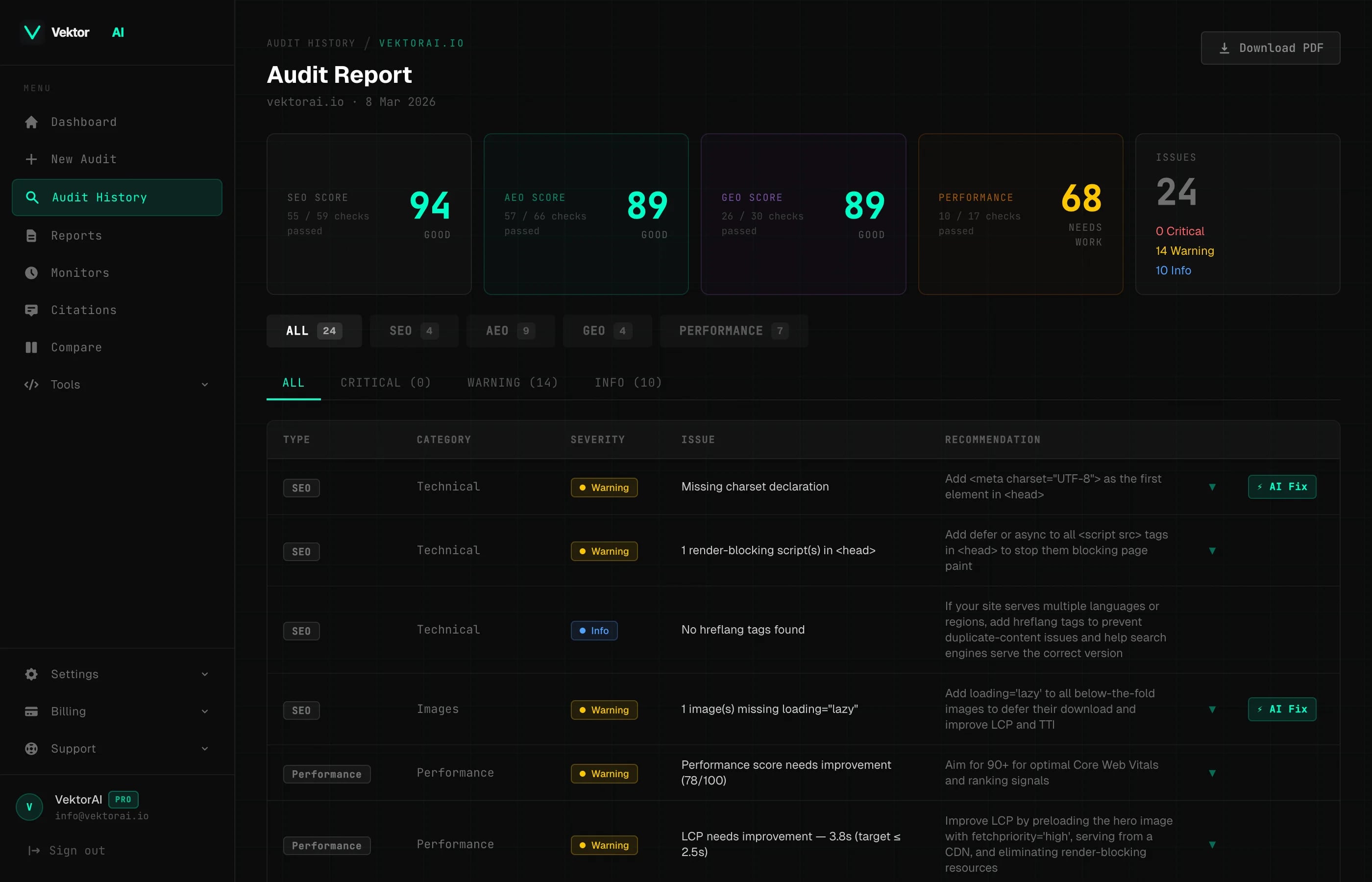
How to Run an Audit
Running your first audit takes about ten seconds:
- 1.Navigate to vektorai.io/site-audit
- 2.Enter the full URL of the page you want to audit (e.g.
https://example.com/blog/my-post) - 3.Click Run Audit and wait a few seconds while VektorAI fetches the page and runs every check.
Once the scan finishes, you will see a full report with scores, issue counts, and actionable fixes.
What Happens During the Scan
When you click Run Audit, VektorAI performs the following steps behind the scenes:
- +HTML fetch — the raw HTML of your page is downloaded and parsed server-side.
- +SEO checks — title tags, meta descriptions, heading hierarchy, image optimization, canonical URLs, internal links, and more.
- +AEO checks — Open Graph tags, Twitter Cards, JSON-LD structured data, author signals, AI bot accessibility, and llms.txt.
- +GEO checks — E-E-A-T signals, quotability, citation depth, content depth, and query alignment.
- +Performance checks — Core Web Vitals pulled from Google PageSpeed Insights (LCP, CLS, TBT, FCP, TTFB).
The entire process typically completes in under 15 seconds depending on the target page size and PageSpeed Insights availability. According to Google's Search Central documentation, pages with complete meta tags and structured data see significantly higher crawl rates.
"Automated auditing catches 85% of common SEO issues that manual review misses, according to industry benchmarks."
— Search Engine Journal
Public vs. Authenticated Audits
Anyone can run a free audit without an account — no sign-up required. The difference is what you see in the results:
| Access Level | Issues Shown | Rate Limit | AI Fix |
|---|---|---|---|
| Anonymous | First 5 issues | 15 req / 15 min | No |
| Free Account | First 5 issues | 15 req / 15 min | No |
| Pro Plan | All issues + PDF export | 20 req / 15 min | Yes |
Single Report Purchase — $9
Don't need a full subscription? You can unlock the complete issue list and a downloadable PDF export for any single audit by purchasing a one-time report for $9. No account required — just run the audit, pay, and get instant access to the full results.
Issue Severity Levels
Every issue found by the audit is tagged with one of three severity levels:
Critical
High-impact issues that directly hurt your rankings, AI visibility, or user experience. Fix these first. For example, a missing meta description is flagged as Critical because it directly impacts click-through rates from search results. Other examples include: missing title tag, broken canonical URL, and missing JSON-LD.
Warning
Moderate-impact issues that degrade quality signals or miss optimization opportunities. These won't break your site but will hold back your scores. Examples: title too long, images without lazy loading, thin content.
Info
Best-practice suggestions that improve polish and competitiveness. Not urgent, but worth addressing over time. Examples: missing Open Graph image dimensions, no Twitter card type, no llms.txt file.
What Each Issue Includes
Every issue in the audit report comes with enough context to understand and fix it immediately:
- +Category — which pillar the issue belongs to (SEO, AEO, GEO, or Performance).
- +Title — a concise name for the issue (e.g. "Missing meta description").
- +Description — an explanation of why this matters and what it affects.
- +Severity — Critical, Warning, or Info.
- +Copy-paste fix — a ready-to-use HTML code snippet you can drop straight into your page's source.
<!-- Example fix: missing meta description -->
<meta name="description" content="Your page description here (50-160 chars)" />
Rate Limiting
To keep the service fast and fair for everyone, audit requests are rate-limited per 15-minute window:
- +Anonymous visitors — 15 requests per 15 minutes
- +Free account users — 15 requests per 15 minutes
- +Pro plan users — 20 requests per 15 minutes
Cached Results
How does caching work?
Audit results are cached for 2 hours. If you (or anyone else) audit the same URL within that window, VektorAI returns the cached report instantly instead of re-scanning.